User Management
PMP4PG supports multiple user accounts. Administrators can create, view and delete user accounts from the Users section.
Accessing User Management
Navigate to Users in the top navigation bar.
The Users section is accessible to administrator accounts only.
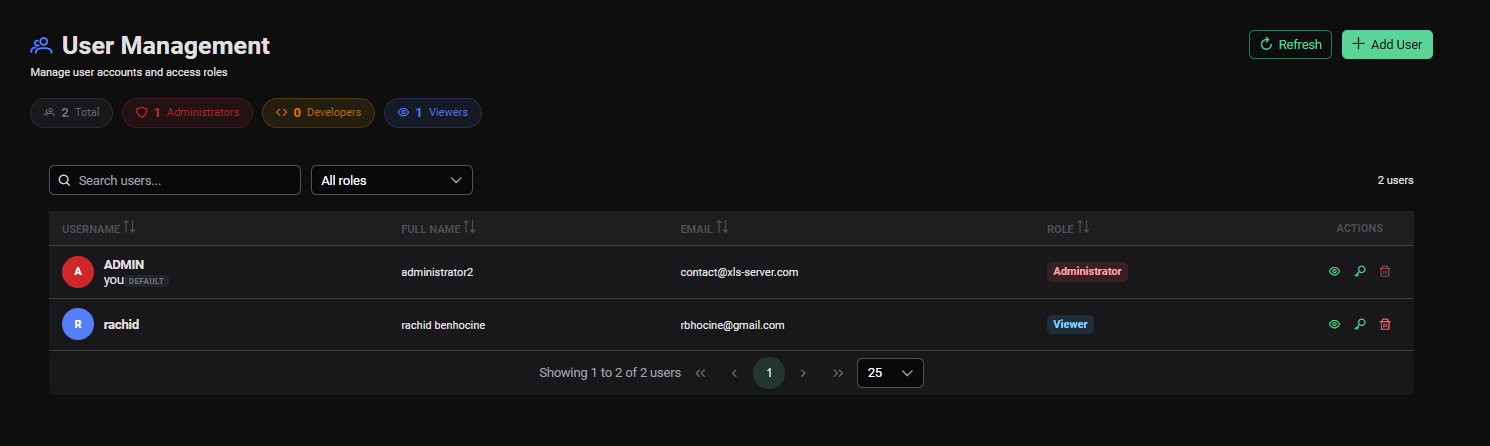
User List
The user list displays all registered platform users with the following information:
| Column | Description |
|---|---|
| Username | Login name |
| Full Name | Display name |
| Contact email address | |
| Role | User role (Admin / Viewer) |
| Created | Account creation date |
| Actions | Delete action |
Creating a New User
Click Add User to open the user creation form.
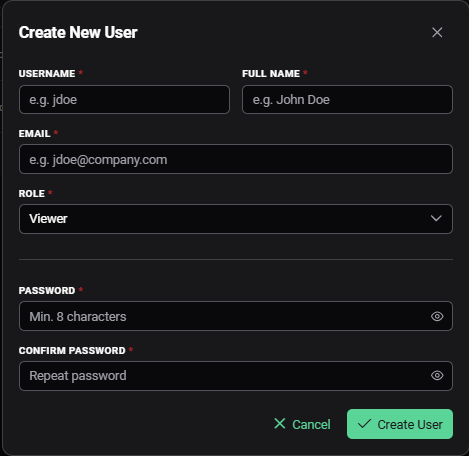
Fill in the required fields:
| Field | Required | Description |
|---|---|---|
| Username | Yes | Unique login identifier |
| Full Name | Yes | Display name |
| Yes | Contact email | |
| Password | Yes | Initial password |
| Role | Yes | Admin or Viewer |
Click Save to create the account.
Communicate the initial password to the new user through a secure channel and ask them to change it after their first login.
Deleting a User
Click the delete icon on a user row to remove that account from the platform.
Deleting a user account is immediate and cannot be undone. The user will lose access to the platform instantly.
User Roles
| Role | Access Level |
|---|---|
| Admin | Full access — can manage users, servers, and all platform features |
| Viewer | Read-only access — can view dashboards, ASH, AWR and Trends, but cannot manage servers or users |
Changing Your Password
Any user can change their own password by clicking their username in the top-right corner and selecting Profile Settings.