Activity Timeline
The Activity Timeline is the central chart of the ASH Viewer. It shows the number of active sessions over time, broken down by wait event type — giving you an immediate visual representation of what your PostgreSQL instance was doing at any point in the selected window.
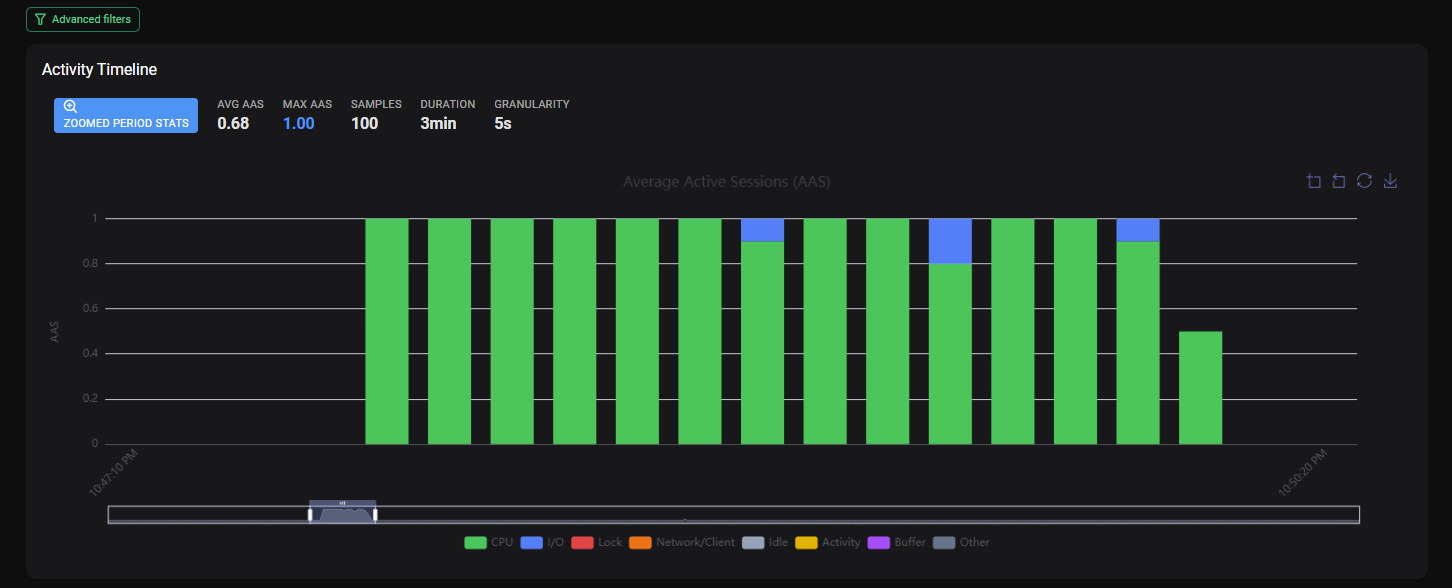
Reading the Chart
The timeline is a stacked bar chart where:
- The X axis represents time (the selected window or zoom interval)
- The Y axis represents the number of active sessions
- Each color segment within a bar represents a different wait event type
Wait Event Type Colors
| Color | Wait Event Type | Meaning |
|---|---|---|
| 🟢 Green | CPU | Sessions actively using CPU — no wait |
| 🔵 Blue | I/O | Sessions waiting for disk reads/writes |
| 🔴 Red | Lock | Sessions waiting for a lock |
| 🟠 Orange | Network/Client | Sessions waiting on network or client |
| ⚪ Gray | Idle | Sessions idle or idle in transaction |
| 🟡 Yellow | Activity | Background activity waits |
| 🟣 Purple | Buffer | Sessions waiting on buffer operations |
| ⚫ Dark Gray | Other | Other or unclassified wait event types |
Interacting with the Timeline
Zoom In
Click and drag on the chart to select a specific time interval. All other ASH panels update to reflect only the sessions and queries active during that interval.
Hover
Hover over any bar to see a tooltip with the exact counts per wait event type for that time bucket.
Reset Zoom
Click Reset Zoom above the chart, or select a new time window from the window selector to clear the zoom.
Identifying Patterns
Healthy Instance
A healthy, normally loaded instance shows predominantly green (CPU) activity with low, consistent bar heights.
{screenshot: ash-timeline-healthy}
Lock Contention Spike
A sudden increase in red (Lock) segments indicates sessions piling up waiting for locks. This often corresponds to a long-running transaction blocking others.
I/O Saturation
A sustained increase in blue (IO) segments suggests disk I/O bottleneck — possibly caused by a large sequential scan, index rebuild or heavy write workload.
Timeline and Other Panels
The Activity Timeline acts as the master filter for all other panels on the ASH Viewer page. When you zoom into a time range on the timeline:
- Top SQL shows only queries active during that range
- Top Wait Events reflects only waits from that range
- Lock Contention shows only locks detected during that range
This allows you to precisely isolate what was happening during a specific incident or spike.