Bloat Analysis
The Bloat Analysis section identifies tables and indexes with excessive dead tuples (table bloat) or wasted space (index bloat). Bloat accumulates over time due to PostgreSQL's MVCC mechanism and must be managed through regular VACUUM operations.
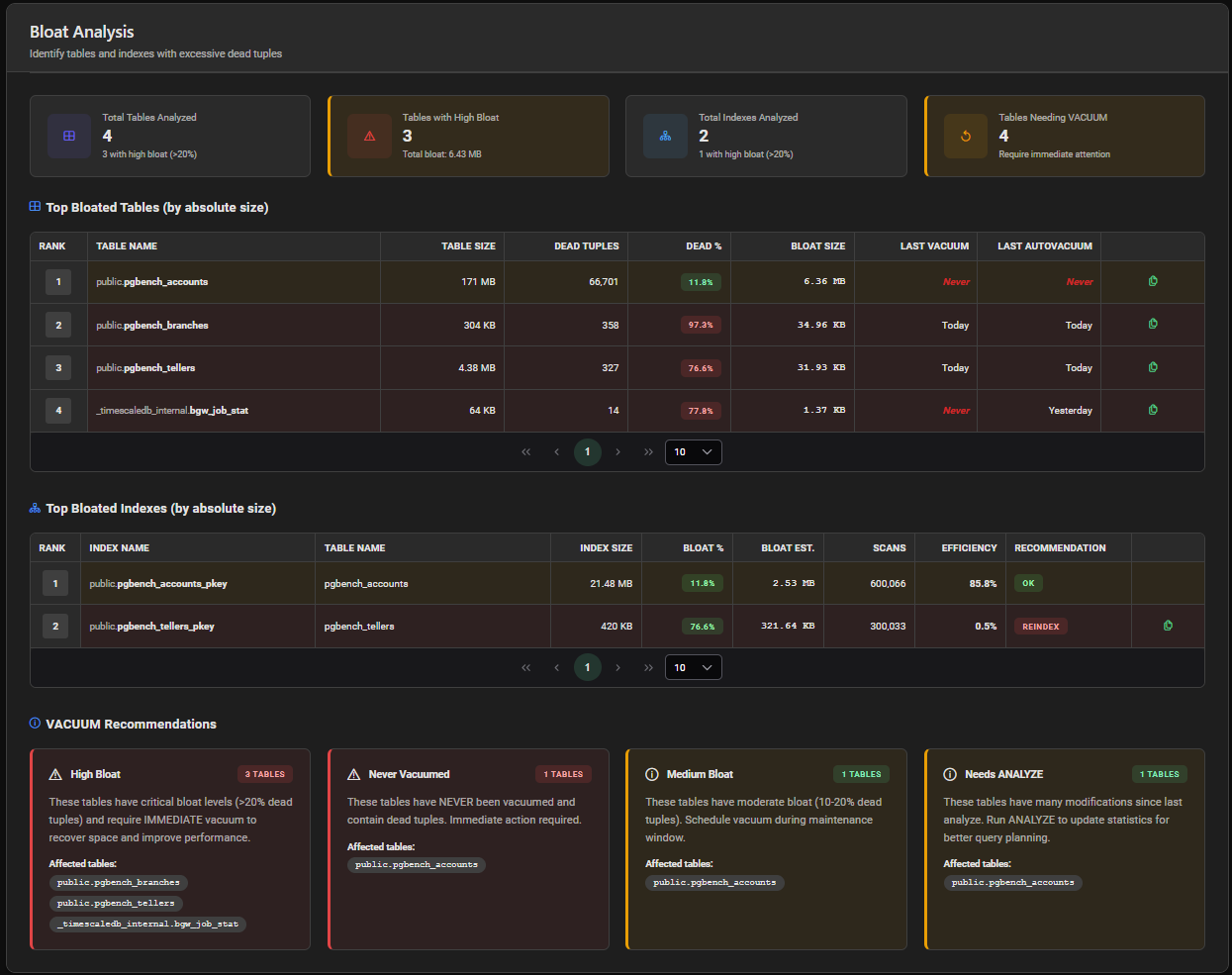
Summary Cards
| Card | Description |
|---|---|
| Total Tables Analyzed | Number of tables examined + count with high bloat (> 20%) |
| Tables with High Bloat | Tables with bloat > 20%, with total reclaimable bloat size |
| Total Indexes Analyzed | Number of indexes examined + count with high bloat |
| Tables Needing VACUUM | Tables requiring immediate VACUUM attention |

Top Bloated Tables
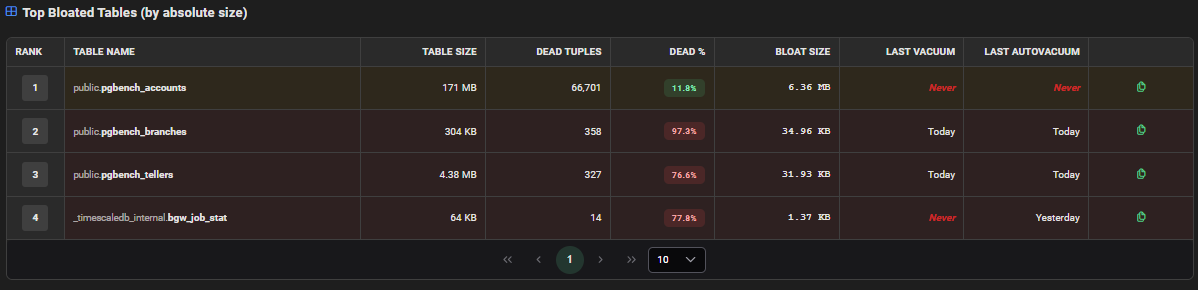
Tables ranked by absolute bloat size.
| Column | Description |
|---|---|
| Rank | Position by bloat size |
| Table Name | Schema and table name |
| Table Size | Current physical size of the table |
| Dead Tuples | Number of dead (obsolete) tuples |
| Dead % | Percentage of dead tuples — color-coded badge by severity |
| Bloat Size | Estimated reclaimable space |
| Last Vacuum | Timestamp of the last manual VACUUM run |
| Last Autovacuum | Timestamp of the last autovacuum run |
| Script | Copy button to generate the VACUUM script for this table |
Bloat Severity Levels
| Dead % | Severity | Badge |
|---|---|---|
| < 10% | Normal | 🟢 Green |
| 10–20% | Low | 🔵 Blue |
| 20–40% | Warning | 🟠 Orange |
| > 40% | Critical | 🔴 Red |
Top Bloated Indexes
Indexes ranked by absolute bloat size.
| Column | Description |
|---|---|
| Rank | Position by bloat estimate |
| Index Name | Schema and index name |
| Table Name | Associated table |
| Index Size | Current physical size of the index |
| Bloat % | Estimated bloat percentage — color-coded by severity |
| Bloat Est. | Estimated reclaimable space |
| Scans | Number of index scans during the report period |
| Efficiency | Index scan efficiency percentage |
| Recommendation | Suggested action (REINDEX, MONITOR, OK) |
| Script | Copy button to generate the REINDEX script (when applicable) |

Index Recommendations
| Recommendation | Meaning |
|---|---|
| REINDEX | Index bloat is significant — rebuild the index |
| MONITOR | Bloat is growing — keep an eye on it |
| OK | Index is healthy |
REINDEX locks the index during rebuild. For production tables, use REINDEX CONCURRENTLY to avoid blocking reads and writes:
REINDEX INDEX CONCURRENTLY schema.index_name;
VACUUM Recommendations
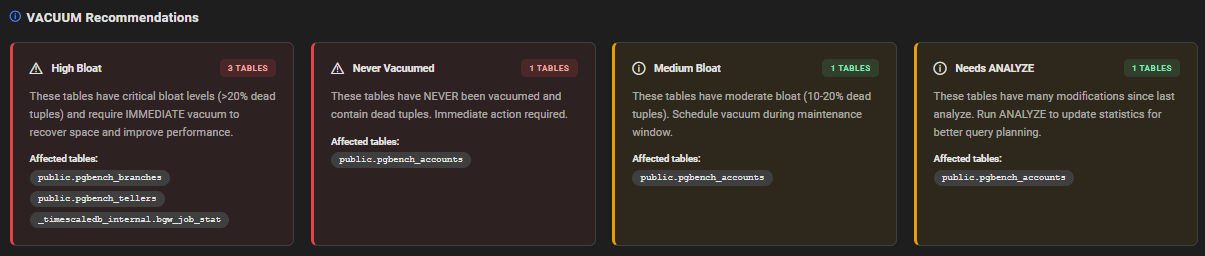
Below the tables and indexes, an automated VACUUM Recommendations section groups affected tables by recommendation type and provides:
- Category — type of recommendation (e.g. immediate vacuum, autovacuum tuning)
- Affected Tables Count — number of tables concerned
- Message — explanation of the recommendation
- Affected Tables — list of table names
When no recommendations are generated, a green confirmation message indicates that database maintenance is up to date.
Interpretation Guide
Tables Never Vacuumed
If Last Vacuum and Last Autovacuum are both empty, the table has never been vacuumed. This is critical for tables with frequent updates or deletes — autovacuum configuration should be reviewed.
High Dead Tuples with Recent Autovacuum
If autovacuum ran recently but dead tuples are still high, autovacuum thresholds may be too conservative. Consider lowering autovacuum_vacuum_scale_factor for that table:
ALTER TABLE schema.table_name SET (
  autovacuum_vacuum_scale_factor = 0.01,
  autovacuum_analyze_scale_factor = 0.005
);
Large Bloat Size
If bloat represents a significant portion of the table size, consider VACUUM FULL during a maintenance window (requires AccessExclusiveLock) or pg_repack for online bloat removal.