Time Model Statistics
The Time Model Statistics section breaks down how database time was spent during the report period, using data from Active Session History (ASH). It answers the fundamental question: of all the time sessions spent in the database, how much went to CPU execution versus waiting?
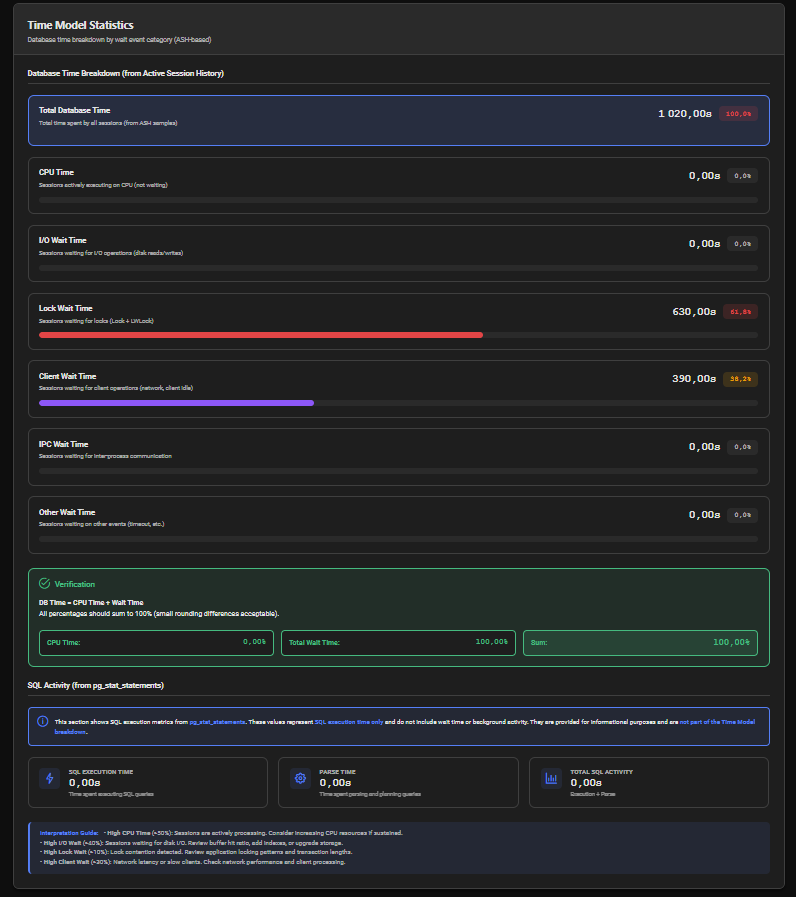
Database Time Breakdown (ASH-based)
The core of this section is a breakdown of DB Time by wait event category. Each category is displayed with:
- Time in seconds — absolute time attributed to this category
- Percentage of DB Time — share of total DB Time
- Progress bar — visual representation of the percentage
| Category | Description |
|---|---|
| DB Time | Total database time — sum of CPU Time and all Wait Times (100%) |
| CPU Time | Time sessions spent actively executing on CPU — no wait |
| I/O Wait | Time sessions spent waiting for disk reads/writes |
| Lock Wait | Time sessions spent waiting for locks (Lock, LWLock) |
| Network/Client Wait | Time sessions spent waiting for client or network (Client, IPC) |
| Idle Wait | Time sessions spent in timeout-based waits (Timeout events) |
| Activity Wait | Time sessions spent in background activity waits |
| Buffer Wait | Time sessions spent waiting on buffer pin operations |
| Other Wait | Time attributed to unclassified wait event types |
SQL Activity (from pg_stat_statements)
A separate informational section displays SQL execution metrics sourced from pg_stat_statements. These values are not part of the Time Model breakdown — they represent SQL-level execution time only, without wait time or background activity:
| Metric | Description |
|---|---|
| SQL Execution Time | Time spent executing SQL queries (from pg_stat_statements.total_exec_time) |
| Parse Time | Time spent parsing and planning queries (from pg_stat_statements.total_plan_time) |
| Total SQL Activity | SQL Execution Time + Parse Time |
pg_stat_statements measures execution time from the perspective of individual statements. It does not account for wait time between statements, background processes or sessions idle in transaction. The ASH-based Time Model is a more complete picture of where DB Time actually went.
Interpretation Guide
| Condition | Threshold | Action |
|---|---|---|
| High CPU Time | > 50% | Sessions are actively processing. If sustained and performance is degraded, investigate Top SQL for CPU-intensive queries. |
| High I/O Wait | > 40% | Sessions waiting for disk I/O. Review buffer cache hit ratio, add missing indexes, or consider storage upgrades. |
| High Lock Wait | > 10% | Lock contention detected. Review application locking patterns and transaction lengths in Lock Contention Analysis. |
| High Network/Client Wait | > 30% | Network latency or slow client processing. Check network performance and application connection handling. |
Relationship to Load Profile
The Time Model complements the Load Profile:
- Load Profile tells you how much work the database did (AAS, transactions/sec, reads/sec)
- Time Model tells you how that work was spent (CPU vs. waiting, and what kind of waiting)
A high AAS in the Load Profile combined with a high CPU Time percentage in the Time Model indicates a genuinely compute-bound workload. A high AAS with high I/O or Lock Wait percentages points to contention that needs to be resolved.